
Free ai generated artificial intelligence typography vector

How Graphene Technologies in Houston Eliminates Microsoft 365 Copilot License Waste

Artificial Intelligence continues to reshape how businesses operate. As a result, many organizations rush to adopt tools that promise higher productivity and faster output. Microsoft 365 Copilot stands out because it integrates directly into the Office tools employees already use every day.

However, enthusiasm often leads to overbuying. Many companies license Copilot for every employee without validating real demand. Consequently, unused AI licenses pile up as expensive shelfware.

That is why Graphene Technologies Houston IT security recommends regular Microsoft 365 Copilot audits. You cannot optimize what you do not measure. A proper audit reveals who actually uses Copilot, who benefits from it, and where licensing costs can be reduced without hurting productivity.

Why AI License Waste Hurts Your Bottom Line

At first glance, buying licenses in bulk feels efficient. Procurement becomes simple, and everyone has access. However, this approach ignores how employees actually work.

Not every role needs AI assistance:

  • A receptionist may never use advanced Copilot features

  • A field technician may not open Microsoft 365 desktop apps

  • Some users may only log in once and never return

When licenses sit unused, costs add up quickly. Over time, AI shelfware drains budgets that could support higher-value initiatives. Therefore, identifying unused Copilot licenses becomes a critical cost-control measure.

By contrast, Graphene Technologies Houston IT security helps businesses align licensing with real usage so every dollar delivers value.

Step 1: Review Microsoft 365 Copilot Usage Reports

Microsoft provides built-in reporting tools that make usage analysis straightforward. The Microsoft 365 admin center offers detailed visibility into Copilot adoption.

From the dashboard, you can track:

  • Enabled users

  • Active users

  • Usage trends over time

  • Feature engagement

This data quickly highlights inactive users and low-engagement accounts. As a result, IT teams can distinguish power users from employees who never open Copilot.

Microsoft 365 usage reporting overview

Step 2: Turn Usage Data into Cost-Saving Decisions

Once waste becomes visible, action should follow. Start by reclaiming licenses from inactive users. Then, reassign those licenses to employees who actually need AI support.

In addition, establish a formal request process for Copilot access. When employees must justify their need, license sprawl slows immediately. This step alone often reduces AI subscription costs significantly.

Because IT budget optimization is ongoing, Graphene Technologies recommends reviewing Copilot usage monthly or quarterly. Regular audits prevent waste from creeping back in.

Step 3: Improve Adoption with Targeted Training

Low Copilot usage does not always mean low value. In many cases, employees avoid the tool because they lack training or confidence.

Instead of cutting licenses immediately, assess why usage is low. Surveys and interviews often reveal skill gaps rather than resistance.

Effective adoption strategies include:

  • Lunch-and-learn demonstrations

  • Short task-based tutorials

  • Internal success stories from power users

  • Department-level Copilot champions

When employees understand how Copilot fits their daily work, adoption improves quickly. As a result, previously wasted licenses often become productivity multipliers.

Step 4: Establish a Clear AI Governance Policy

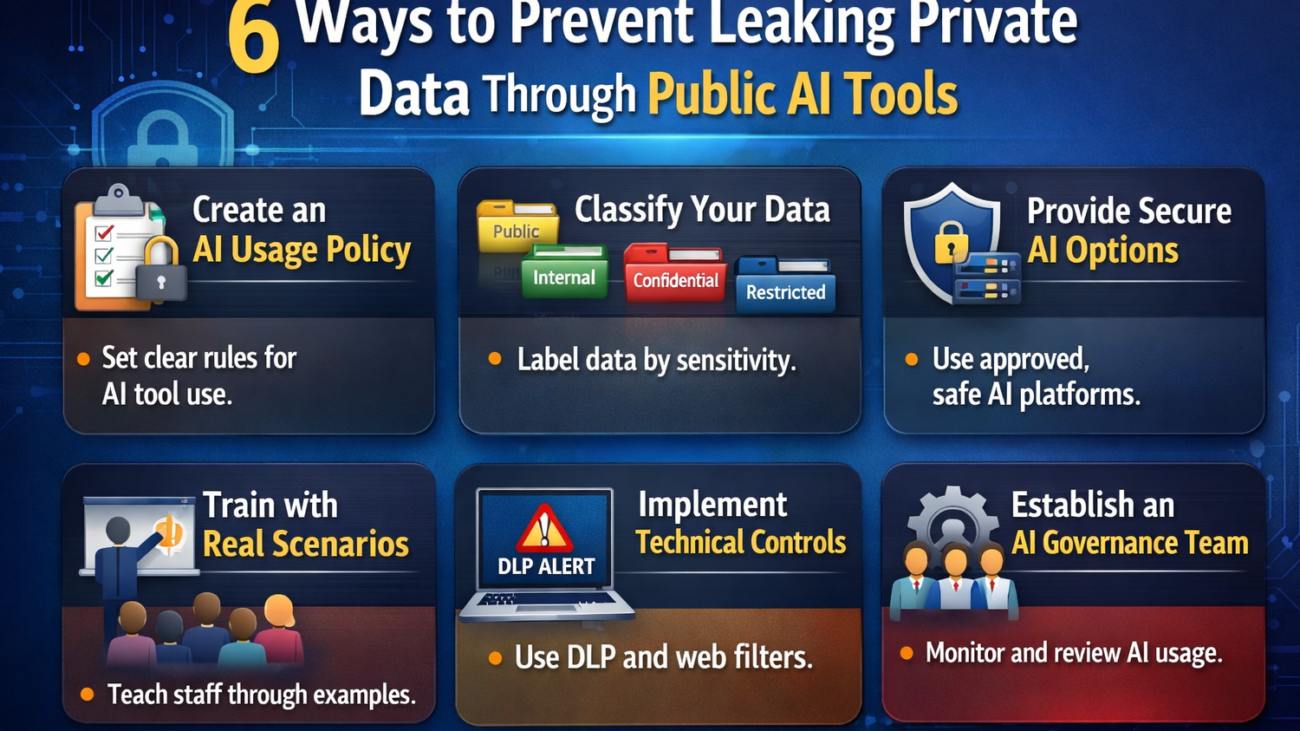
Governance prevents AI sprawl before it starts. A formal Copilot policy defines who qualifies for a license and how usage is reviewed.

Effective policies typically:

  • Assign licenses automatically to high-impact roles

  • Require approval for optional roles

  • Define regular review cycles

  • Set expectations for ongoing usage

Clear communication matters. When employees understand how decisions are made, accountability improves. Over time, this structure eliminates the “everyone gets a license” mindset.

Step 5: Audit Before Renewal, Not After

The worst time to review Copilot usage is right before renewal. Instead, audits should occur at least 90 days in advance.

Early reviews provide:

  • Time to right-size licenses

  • Data for vendor negotiations

  • Flexibility to adjust contracts

Armed with real usage data, organizations avoid another year of paying for shelfware. This preparation strengthens negotiating power and protects long-term budgets.

Smarter AI Management Starts with Graphene Technologies

Subscription-based AI tools demand active oversight. Without regular review, costs escalate while value stagnates. Microsoft 365 Copilot audits ensure spending aligns with real business impact.

Graphene Technologies Houston IT security helps organizations audit Copilot usage, reclaim wasted licenses, improve adoption, and build governance frameworks that scale.

Contact Graphene Technologies to audit your Microsoft 365 Copilot licenses

a close up of a cell phone with an ai button

The AI Policy Playbook: 5 Critical Rules to Govern ChatGPT and Generative AI

ChatGPT and other generative AI tools, such as DALL-E, offer significant benefits for businesses. However, without proper governance, these tools can quickly become a liability rather than an asset. Unfortunately, many companies adopt AI without clear policies or oversight.

Only 5% of U.S. executives surveyed by KPMG have a mature, responsible AI governance program. Another 49% plan to establish one in the future but have not yet done so. Based on these statistics, while many organizations see the importance of responsible AI, most are still unprepared to manage it effectively.

Looking to ensure your AI tools are secure, compliant, and delivering real value? This article outlines practical strategies for governing generative AI and highlights the key areas organizations need to prioritize.


Benefits of Generative AI to Businesses

Businesses are embracing generative AI because it automates complex tasks, streamlines workflows, and speeds up processes. Tools such as ChatGPT can create content, generate reports, and summarize information in seconds. AI is also proving highly effective in customer support, automatically sorting queries and directing them to the right team member.

According to the National Institute of Standards and Technology (NIST), generative AI technologies can improve decision-making, optimize workflows, and support innovation across industries. All these benefits aim for greater productivity, streamlined operations, and more efficient business performance.


5 Essential Rules to Govern ChatGPT and AI

Managing ChatGPT and other AI tools isn’t just about staying compliant; it’s about keeping control and earning client trust. Follow these five rules to set smart, safe, and effective AI boundaries in your organization.


Rule 1. Set Clear Boundaries Before You Begin

A solid AI policy begins with clear boundaries for where you can or cannot use generative AI. Without these boundaries, teams may misuse the tools and expose confidential data. Clear ownership keeps innovation safe and focused. Ensure that employees understand the regulations to help them use AI confidently and effectively. Since regulations and business goals can change, these limits should be updated regularly.


Rule 2: Always Keep Humans in the Loop

Generative AI can create content that sounds convincing but may be completely inaccurate. Every effective AI policy needs human oversight, AI should assist, not replace, people. It can speed up drafting, automate repetitive tasks, and uncover insights, but only a human can verify accuracy, tone, and intent.

This means that no AI-generated content should be published or shared publicly without human review. The same applies to internal documents that affect key decisions. Humans bring the context and judgment that AI lacks.

Moreover, the U.S. Copyright Office has clarified that purely AI-generated content, lacking significant human input, is not protected by copyright. This means your company cannot legally own fully automated creations. Only human input can help maintain both originality and ownership.


Rule 3: Ensure Transparency and Keep Logs

Transparency is essential in AI governance. You need to know how, when, and why AI tools are being used across your organization. Otherwise, it will be difficult to identify risks or respond to problems effectively.

A good policy requires logging all AI interactions. This includes prompts, model versions, timestamps, and the person responsible. These logs create an audit trail that protects your organization during compliance reviews or disputes. Additionally, logs help you learn. Over time, you can analyze usage patterns to identify where AI performs well and where it produces errors.


Rule 4: Intellectual Property and Data Protection

Intellectual property and data management are critical concerns in AI. Whenever you type a prompt into ChatGPT, for instance, you risk sharing information with a third party. If the prompt includes confidential or client-specific details, you may have already violated privacy rules or contractual agreements.

To manage your business effectively, your AI policy should clearly define what data can and cannot be used with AI. Employees should never enter confidential information or information protected by nondisclosure agreements into public tools.


Rule 5: Make AI Governance a Continuous Practice

AI governance isn’t a one-and-done policy. It’s an ongoing process. AI evolves so quickly that regulations written today can become outdated within months. Your policy should include a framework for regular review, updates, and retraining.

Ideally, you should schedule quarterly policy evaluations. Assess how your team uses AI, where risks have emerged, and which technologies or regulations have changed. When necessary, adjust your rules to reflect new realities.


Why These Rules Matter More Than Ever

These rules work together to create a solid foundation for using AI responsibly. As AI becomes part of daily operations, having clear guidelines keeps your organization on the right side of ethics and the law.

The benefits of a well-governed AI use policy go beyond minimizing risk. It enhances efficiency, builds client trust, and helps your teams adapt more quickly to new technologies by providing clear expectations. Following these guidelines also strengthens your brand’s credibility, showing partners and clients that you operate responsibly and thoughtfully.


Turn Policy into a Competitive Advantage

Generative AI can boost productivity, creativity, and innovation, but only when guided by a strong policy framework. AI governance doesn’t hinder progress; it ensures that progress is safe. By following the five rules outlined above, you can transform AI from a risky experiment into a valuable business asset.

We help businesses build strong frameworks for AI governance. Whether you’re busy running your operations or looking for guidance on using AI responsibly, we have solutions to support you. Contact us today to create your AI Policy Playbook and turn responsible innovation into a competitive advantage.